Step 7
VMS Form
Track and manage vehicle entries, exits, blocked vehicles, and pre-registered vehicles across sites.
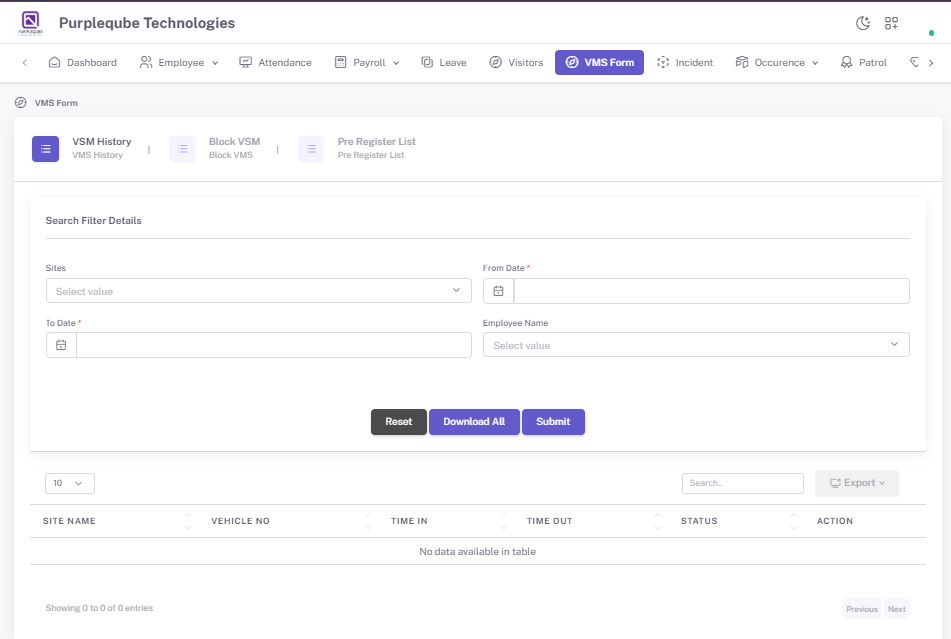
The VMS Form module is designed to manage vehicle entry and exit records across sites. It helps track vehicle movements, monitor blocked vehicles, and maintain pre-registered vehicle information. The module consists of three sub-sections:
- VSM History – View detailed records of all vehicle entries and exits.
- Block VSM – Manage and view blocked vehicle records.
- Pre Register List – View and manage pre-registered vehicles.
7.1 VSM History
The VSM History section provides a centralized view of all vehicle movement records.
Search Filter Details
Users can filter vehicle records using the following criteria:
- Sites – Select the site from the dropdown (Select value).
- From Date – Select the start date for the search range.
- To Date – Select the end date for the search range.
- Employee Name – Select the employee name from the dropdown (Select value).
Actions
- Reset – Clear all filter criteria and reset the search.
- Download All – Download all vehicle records based on the applied filters.
- Submit – Apply the selected filters and display the results.
 VMS page.png)
VSM History List
The records list displays the following information:
- SITE NAME – Name of the site where the vehicle entry or exit is recorded.
- VEHICLE NO – Vehicle registration number.
- TIME IN – Vehicle entry time.
- TIME OUT – Vehicle exit time.
- STATUS – Current status of the vehicle record.
- ACTION – Options to view or manage vehicle records.
 VMS list.png)
7.2 Block VSM
The Block VSM section allows users to manage and view blocked vehicle records.
 VMS block page.png)
7.3 Pre Register List
The Pre Register List section allows users to view and manage pre-registered vehicles.
 VMS pre register page.png)